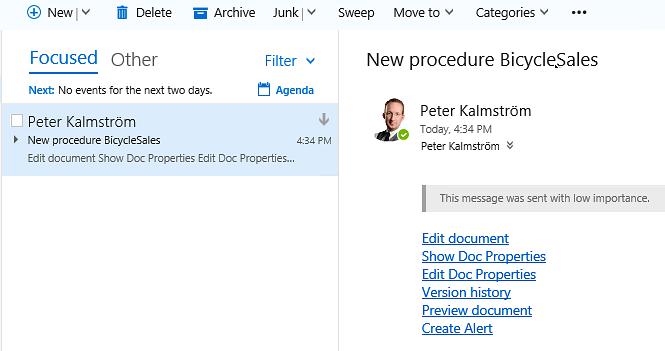
When
you create a flow that sends an e-mail notification when
a new item is added to a SharePoint list or library, you
probably want to include some links in the e-mail. In the
demo below Peter Kalmström, CEO and Systems Designer of
kalmstrom.com Business Solutions, gives a few examples on
how to build common links.
Peter uses a Procedures
document library with a flow in his example, but the links
he shows can be used in SharePoint lists too, with minor
modifications. These modifications are pointed out in the
demo.
In the demonstration Peter uses links to one
specific document in various modes, and he pastes all links
into the e-mail body when he creates the flow. Then he replaces
the specific parts of the link code with dynamic fields,
so that the links always point to the document that has
been created.
The links can of course be written
in also. In that case the dynamic fields are selected directly
while the link is built.
Below are the links Peter shows. Red text in the
link code represents dynamic fields. For each such parameter,
Peter removes the item specific text in the link and replaces
it with the proper field.
edit mode: <site URL>/Lists/<List
Name>/Editform.aspx? ID=[ID] Note that "Lists" is for English SharePoint
versions. If you have another language, use the
corresponding word in that language. For example,
when you have a Swedish SharePoint you should use
"Listor".
Version history: <site URL>/_layouts/15/Versions.aspx?
(/list=<List ID>) &FileName=<site relative
URL>/ [Folder path] [File
name with extension]
The document in preview mode: <site URL>[Folder
path]/Forms/AllItems.aspx? id=<site relative
URL>/ [Folder path] [File
name with extension] &parent=<site
relative URL>/[Folder path]
Alert on document/item: <site URL>/ _layouts/15/SubNew.aspx?List=<List
ID>&ID=[ID]
Note that these alerts now have been removed
from SharePoint Online and replaced with rules and reminders.
In the demo Peter also shows how to get the List ID from
the List settings URL.
The links described above work fine when users upload
files to a library and do not changed the file names.
When a new document is created in SharePoint, there
will probably be a problem with links that include the dynamic
field "File name with extension":
A user creates a document that automatically gets
the name Document1.docx.
Flow sends an e-mail with a link to the document.
The user changes the file name into something more
descriptive.
Flow cannot change the file name in the already
sent e-mail, so the link will not work.
Adding a delay to the flow will solve that problem.
If you prefer to use a SharePoint Designer workflow
for the e-mail alert, please refer to the article about
links in workflow generated e-mails. SharePoint Designer
workflows are no longer supported in SharePoint Online.


 When
you create a flow that sends an e-mail notification when
a new item is added to a SharePoint list or library, you
probably want to include some links in the e-mail. In the
demo below Peter Kalmström, CEO and Systems Designer of
kalmstrom.com Business Solutions, gives a few examples on
how to build common links.
When
you create a flow that sends an e-mail notification when
a new item is added to a SharePoint list or library, you
probably want to include some links in the e-mail. In the
demo below Peter Kalmström, CEO and Systems Designer of
kalmstrom.com Business Solutions, gives a few examples on
how to build common links.