PDF Creator Editions
PDF Creator for SharePoint comes
 in
two editions and three packages: in
two editions and three packages:
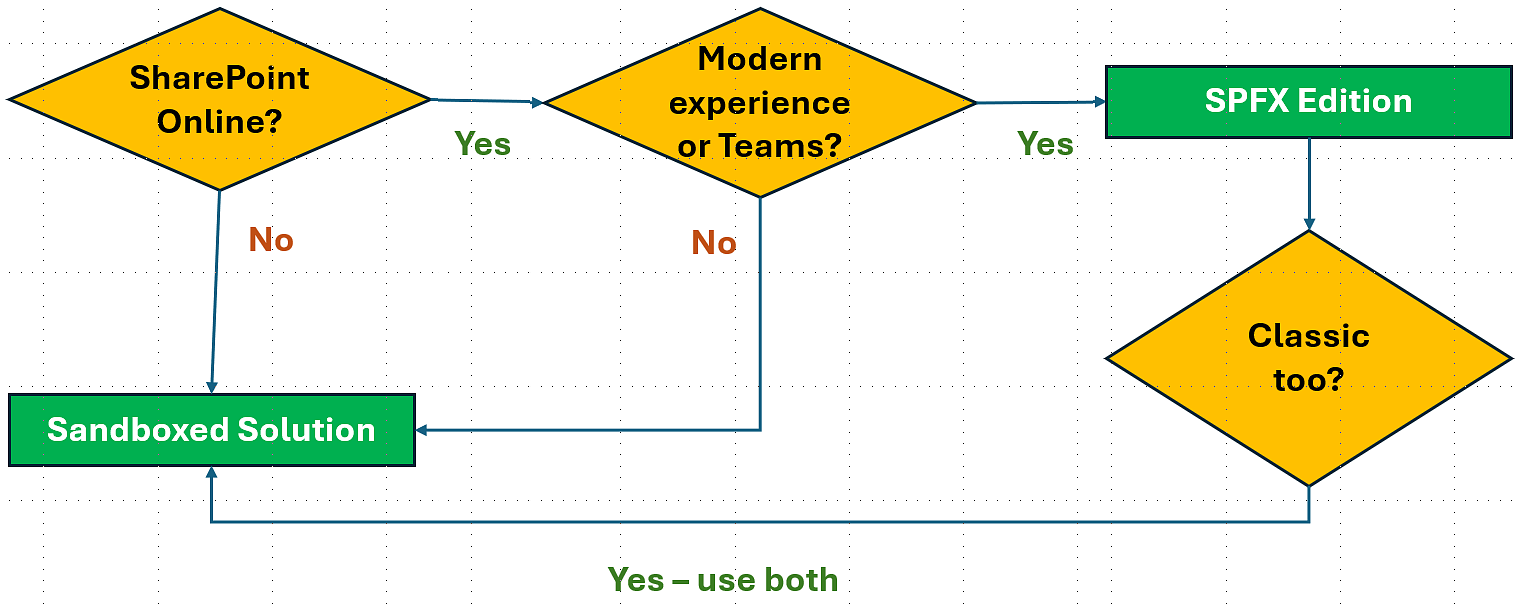
- The modern SPFx edition, for SharePoint Online modern
experience and Teams. The SPFx edition gives you
PDF Creator in both lists and libraries.
- The Sandboxed solution supports all SharePoint editions
and can be installed with a WSP file or a PowerShell
script. It gives PDF Creator in lists.
In the classic experience, a PDF file can be created
from one or multiple selected items or from all items
in the list. In the modern experience, a PFD file can
be created from one item or from all items in the list.
| File type: |
2013 |
2016 |
2019 |
SE |
SPO
modern |
SPO
classic |
| .spppkg |
No |
No |
No |
No |
Yes |
No |
| .wsp |
Yes |
Yes |
Yes |
Yes |
Yes |
Yes |
| .ps1 |
Yes |
Yes |
Yes |
Yes |
Yes |
Yes |
All PDF Creator packages are included in the subscription,
so you can use and combine them as you like. They have the
same version number and features.
SPFx edition
The SPFx edition is very easy to manage and can also be
used in Microsoft Teams, so this is the edtion we recommend
that you use if possible. It supports the modern experience
in SharePoint Online.
Download and learn more about
the PDF Creator SPFx edition
Sandboxed Solution
Sometimes you hear that Microsoft has deprecated sandboxed
solutions, but that is not true. What has been deprecated
is custom code in sandboxed solutions, but the kalmstrom.com
SharePoint solutions do not contain such code. Instead our
products build on no-code sandboxed solutions, which Microsoft
will continue to support.
The Sandboxed solution can be installed in two ways:
The Sandboxed solution uses the same folders whether you
use the WSP or PowerShell method to install PDF Creator,
so you can very well upgrade the WSP installations with
the PowerShell script and vice versa. |