Download the Mermaid web part for SharePoint
for evaluators and Standard subscribers
 You
are welcome to download any the Mermaid web part edition for
evaluation or upgrade. You
are welcome to download any the Mermaid web part edition for
evaluation or upgrade.
Editions
the Mermaid web part comes in two editions: SPFx edition,
Sandboxed solution. Both are included in the subscription,
and you may use and combine the packages as you like.
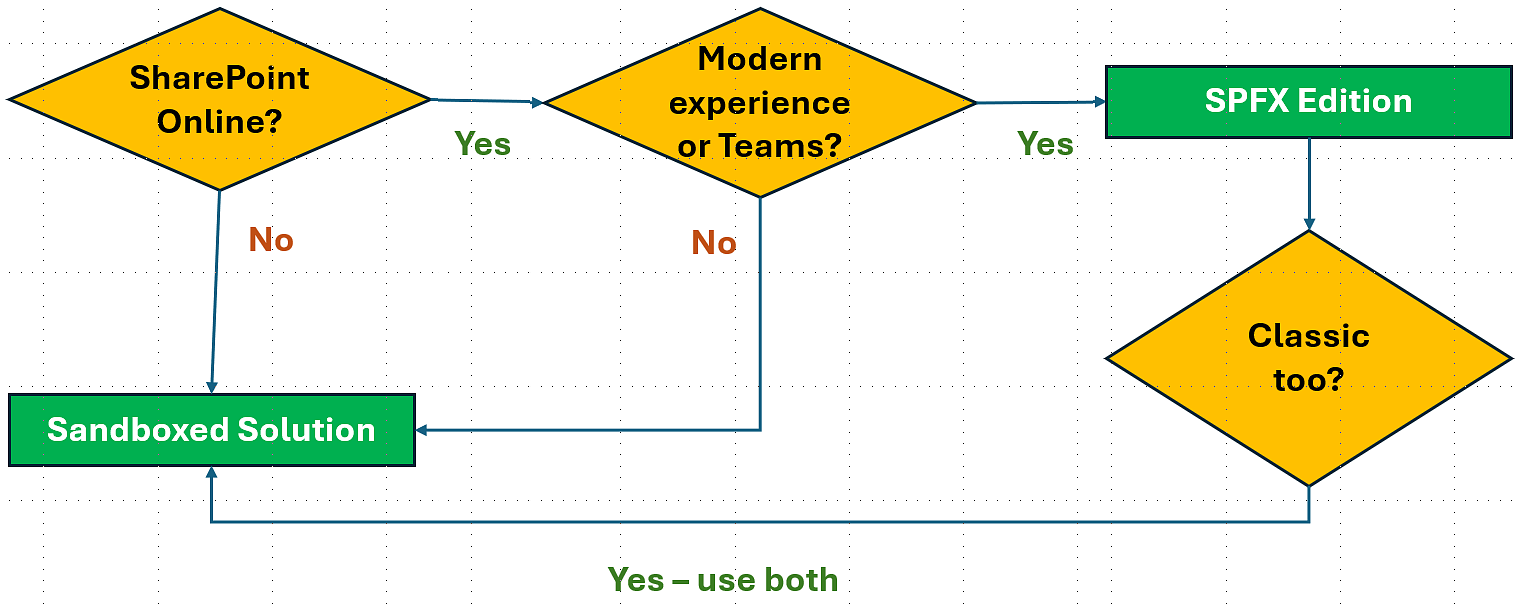
SPFx edition
The SPFx edition gives a client-side extension that is very
easy to manage via the tenant's app catalog. It adds a
the Mermaid web part button in modern lists. SPFx extensions
are currently only supported by the SharePoint Online modern
experience.
Download and learn more about
the the Mermaid web part SPFx edition
Sandboxed Solution
Sometimes you hear that Microsoft has deprecated sandboxed
solutions, but that is not true. What has been deprecated
is custom code in sandboxed solutions, but the kalmstrom.com
SharePoint solutions do not contain such code. Instead our
products build on no-code sandboxed solutions, which Microsoft
will continue to support.
The Sandboxed solution adds a the Mermaid web part button
in classic lists. Switch temporarilly to the classic experience
if you want to copy modern lists.
Download and learn more
about the the Mermaid web part Sandboxed solution
NOTE:
Premium subscribers
should not use the links above. If your organization subscribes
to the Mermaid web part on the Premium plan, you will have
your own, register free copies of all three editions in
your unique download place.
Likeways, if you plan to use our
Installation assistance, don't download anything here.
In that case, we will create a custom PowerShell script
and use it to install the Mermaid web part for you in the
way you want it.
Evaluator Information
The recommended way to test the Mermaid web part is to use
a new site and create new lists for testing, for example
from Excel or from an existing list (SP Online).
Once the testing is completed, you should start over by
installing the Mermaid web part in production sites. It is
however also possible to continue using the same installation
or use an existing site and lists for the evaluation.
When the Mermaid web part has been installed in a site, click
on the the Mermaid web part button in a list command bar or
ribbon 'to create a copy of that list. A dialog will open,
where you can specify which kind of list you want to create
and which items, views and columns should be included.
By default, everything in the original list is included
in the copy and it gets the default site experience.
|
For details about the installation and copy creation,
refer to the the Mermaid web part
Manual.
User Permissions
the Mermaid web part uses standard SharePoint permissions.
- Users must have at least Contribute permission.
In SharePoint Online modern sites, this normally means
Edit permission.
- For installation permissions,
see the download page for each edition.

|
|



