In this demo the kalmstrom.com CEO Peter Kalmstrom shows
how to embed a YouTube video in a SharePoint 2010 site.
You cannot just paste the embed code into the SharePoint
HTML but have to add a Web Part first.
In SharePoint 2013 it is easier, see below.
Here are the steps for SharePoint 2010:
Open SharePoint in Edit mode
Fetch embed code from YouTube
Insert the Content Editor Web Part.
Paste the code in the Web Part HTML
Save.
Steps for SharePoint 2013:
Open SharePoint in Edit mode
Fetch embed code from YouTube
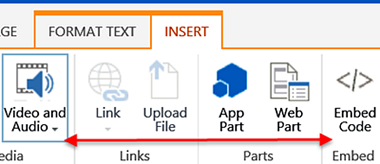
Click on one of the buttons "Video and Audio" or
"Embed Code" under the Insert tab.